
Cisco CCNA Voice Lab Suggestions
We are actually going to cover two different approaches for building your CCNA Voice 640-461 lab today. The challenge in building a CCNA Voice lab is it gets very expensive, very quickly. This is primarily due to the requirement for lots of specialized Voice modules and accessories that are only applicable to a Voice lab. But first of all, let's set the stage with what is the heart and soul of a CCNA Voice lab.
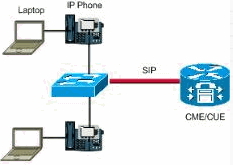
What is Call Manager & CME?
Cisco Call Manager(CUCM) and Call Manager Express(CME) – They both are call processing devices. CME will give call processing facility for locally attached IP / analog phones. Call Manager supports centralized whereas as CME supports distributed voice network architecture. Call Manager handles hundreds of IP phones centrally and it is a dedicated server/device.
CME provides the router based call management features are router access based. CME is a router with Call Manager Express software installed on it, including some telephone devices. The CME router will act as a gateway between PSTN and local IP voice network. Lab setup phones (IP / analog) both will be connected to the Call Manager Express router using FXS ports via the local LAN switch.
In most home lab setup scenarios, CME would be a better choice in terms of cost and flexibility. So the two most common options are as follows:
If we are tight on cash we will use a XM Series router with at least 192MB of DRAM and 48MB of Flash to support the IOS and CME functionality. The downside to this is we can only support CME 4.1.
The better approach is to go with a 2811 router with 512mb DRAM and 128mb flash so you can run IOS 15 with CME 8.6.
Now we can use CME as the SIP trunk gateway between home IP lab network and service provider. We will be learning about SIP server in more detail below.
Now there are actually a few different approaches you can take for building your CCNA Voice lab. So let me start off with the easy one first. CUCM. This runs on a dedicated Cisco server platform. These are generally way too expensive to have in a home Voice lab. Thus the approach taken by most is to virtualize this server to learn your CUCM concepts. This can be done using VMWare workstation or server. We will not go into detail on this as this is covered in the Cisco CCNA Voice lab manual.
Now let's discuss our CME approach as this is what you need to purchase your hardware for. The CCNA Voice exam covers CME 8.6. To run CME 8.6 you will need a Cisco 2811 512/128 router with basically maxed our memory and some Voice PVDM, modules, etc. This approach is covered in our Standard CCNA Voice 640-461 Lab Kit II. The challenge with this kit is it may be a little pricey for some students. So in that case, we have a less expensive option to run CME 4.1 on a 2600XM router. Are all the commands and functionality exactly the same as 8.6? No, but it is a good low cost solution to be able to exercise the Voice topics to prepare to pass the exam.
What Routers, Switches and Modules do I need for my CCNA Voice Lab?
CME 8.6 Approach
To follow the Cisco Press Lab Manual, you will need two 2811 384/128 routers each with a VWIC2-1MFT-T1/E1 and a PVDM2-32. We can then supplement that with some VIC2-2FXS and VIC2-2FXO modules for analog and PBX scenarios. Additionally you will want a pair of PoE(Power over Ethernet) 3550 or better switches and two IP Phones along with an analog phone. If you want to also do the current version Unity Voicemail labs, you will want to add in the aim2-cue module or if you don't mind support for only version 7 versus version 8 you can save some money with the standard aim-cue module. Again, this approach is covered here Standard CCNA Voice 640-461 Lab Kit II.
Now if you want to save some money on this lab, you can cut the lab in half. But you have to understand you will not be able to do any of the exercises for the branch office. You will only be able to do the Headquarters office labs. But it will still provide tons of value and you can add to the lab at a later date.
CME 4.1 Approach
We understand that the newer routers once you add in all the functionality may be a bit expensive for some. So we created our own CCNA Voice Lab Workbook and topology for a home lab. We wanted to make it complicated enough to really show you how the traffic flows. As mentioned before, this uses CME 4.1 which is not exact for the current exam, but it is a good alternative low cost solution. So what is required to follow our lab scenarios? Below we have compiled a list of equipment used in a our CCNA Voice lab topology. So we will take a moment to describe each piece of the lab and we will look into what each component does and why it is required. Keep in mind you can replace any of these items with components that support the same functionality.
- One 2610XM Router 256MB DRAM & 48MB Flash with 12.4 IOS
- Two Cisco 7960 IP Phones
- One Cisco 2611 64/16 Router
- Two Cisco 2950 Switches
- One nm-2v module
- One vic-2fxo module
- One vic-2fxs module
- One nm-cue module
- Six patch cables
- One console kit
Figure 1 below illustrates the CCNA home voice lab setup scenario which we would going to create using the above mentioned components to setup a voiceinfrastructure network.
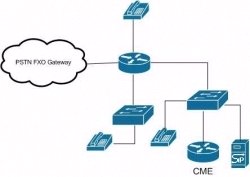
Figure 1: CCNA home voice lab setup scenario
Common Voice Componets
2610XM Router– This 2600 series router gives multiservice voice and data integration, support for embedded call processing with cisco CME 4.1 which we will be using in our home lab. It will give us support for VIC cards. This will act as CME router in lab setup. The single Ethernet models (2650xm, 2620xm, and 2610xm) are comparatively cheaper in cost then the two Ethernet models (2651xm, 2621xm, 2611xm) and we don’t need two Ethernet ports for a CME router. However we will need 192MB DRAM & 48MB flash with to support CME 4.1 and 12.4 IOS for our Voice concepts.
2811 Router – This is the preferred router to run CME 8.6 and IOS 15.1. Just remember you need 512/128 memory to meet the minimum memory requirements.
NM-2V– this for the 2600XM routers since they do not have VIC slots and do not have on board PVDM slots. It is a network voice module which provides the ability to connect directly to PSTN and legacy telephone network to cisco 2600, 3600 and 3700series routers. It has support for voice interface cards (VICs) to provide the connectivity. In our lab scenario we would be using NM-2V to connectrouter 2610XM router. The NM-2V supports up to four voice calls. Diagram below illustrates NM-2V network module.
It gives features following features such as Voice/fax over IP, Router-based, modular design, High-performance digital signal processing (DSP)architecture, Cisco IOS® quality of service (QoS) features: Resource Reservation Protocol (RSVP), weighted fair queuing (WFQ), fragmentation, andinterleave, compliant with H.323 (Audio and video conferencing), integrates with existing phone /fax.
It has feature support for 2600, 3600 and 3700 such as Foreign Exchange Office (FXO) answer supervision, FXO disconnect supervision, Cisco EchoCancellation (ECAN), Connection trunk, Connection private line, automatic ring down (PLAR), Cisco Hoot and Holler, Cisco Tool Command Language (TCL)Interactive Voice Response (IVR) Version 2.0, Transparent Common Channel Signaling (T-CCS), Busyout (local voice Busyout
PVDM – Packet Voice Digital Signal Module pretty much does everything noted above that the NM-2V does. It is just this is on board the 2811 router when you insert one of these modules on the main board. VIC's are Voice Interface Cards supporting analogue connections for: FXO (to the local telephone exchange); FXS (to an analogue phone) and E&M (toa PBX)
VIC-2FXOmodule – this is a two port voice/fax interface card and gets integrated in 2610XM router which we will be using in our CCNA home lab. VIC-2FXO cardwill be used to interface the whole thing with the POTS line coming in to your home and you would be able to connect existing home telephone line intothis module to make and receive calls via your voice lab from your home telephone number.
VIC2-2FXO– Make sure you note the extra 2 in the model number. This is very similar to the plain version of the card for the 2600XM but it supports a few more features that are on the exam and in the labs for the kits using the 2811 routers.
VIC-2FXSmodules – This will be the voice interface card with FXS interface it will connect directly to standard phone, fax machine in the voice network.
VIC2-2FXS– Make sure you note the extra 2 in the model number. This is very similar to the plain version of the card for the 2600XM but it supports a few more features that are on the exam and in the labs for the kits using the 2811 routers.
Cisco IP Phones – 7960G is nice with 6 buttons, but a two line 7940G will also serve the purpose. Basically we need two phones at a minimum, one should haveas many buttons as you can afford, the other can be a two line or even a lowly one line 7912G if price is a concern. We need to buy power bricks too ifswitch isn't PoE. The FXS ports will send the power down the analog phone cables to ring the phones.
In IP phones G stands for global phones use icons on soft keys instead of English text.
Cisco 261164/16 routers – 2611 64/16 routers will act as an HTTP server in lab older CME 4.6 environment.
NM-CUE or AIM-CUE– The NM-CUE or AIM-CUE will give functionalityof intuitive prompts, autoattendent and IVR features in the voice environment. CUE would be the license for the voicemail card. These will allow for Voicemail and Autoattendent so if you want this then you will need one. Unity is an alternate Voicemail System.
AIM2-CUE– The AIM2-CUE will give you additional functionality again covered in the new CME 8.6 lab workbook for the 2811 series routers.
What is a SIP Server for my CCNA Voice Lab?
SIP server– SIP proxy is a software application which provides call routing services in voice networks. SIP is a multimedia communication standard and used forinternal IP telephony transit among enterprise voice gateway and SIP capable IP – PBXs and PSTNs. SIP proxy server accepts the registration requestsfrom SIP endpoints such as IP phones, voice gateways, computer applications. It creates a dynamic record of endpoint’s current contact address. We canalso do static registrations with SIP server.
All calls from PSTN will be handled by a SIP proxy server. Below is the configuration of CME for SIP trunking:
voice service voip
allow-connections sip to sip
sip
registrar server expires max 3600 min 3600
localhost dns:mycompany.test.com
voice class codec 1
codec preference 1 g711ulaw
!— Inbound Translation Rule
!— for Auto Attendant pilot number “500″
voice translation-rule 1
rule 1 /5552222100/ /500/
voice translation-profile AutoAttendant
!— Applied to the inbound dial-peers for AA
translate called 1
!— SIP Trunk Configuration —
dial-peer voice 1 voip
description **Incoming Call from SIP Trunk**
translation-profile incoming AutoAttendant
voice-class codec 1
voice-class sip dtmf-relay force rtp-nte
session protocol sipv2
session target sip-server
incoming called-number .%
dtmf-relay rtp-nte
no vad
dial-peer voice 2 voip
description **Outgoing Call to SIP Trunk**
destination-pattern 9……….
voice-class codec 1
voice-class sip dtmf-relay force rtp-nte
session protocol sipv2
session target sip-server
dtmf-relay rtp-nte
no vad
dial-peer voice 3 voip
description **International Outgoing Call to SIP Trunk**
destination-pattern 9011T
voice-class codec 1
voice-class sip dtmf-relay force rtp-nte
session protocol sipv2
session target sip-server
dtmf-relay rtp-nte
no vad
!— SIP UA Configuration —
sip-ua
authentication username 5552222100 password 075A701E1D5E415447425B
no remote-party-id
retry invite 2
retry register 10
retry options 0
timers connect 100
registrar dns: mycompany.test.com expires 3600
sip-server dns: mycompany.test.com
host-registrar
Now if you follow the topology we described above, you can use our CCNA Voice Lab Workbook to walk you through 30 different labs. The lab workbook builds upon itself so it is imperative that you have similar or better equipment. To make it easy on yourself, we obviously sell the entire lab kits with all the hardware you need. You can review all of them here CCNA Voice Lab Kits to help you achieve your goal of becoming CCNA Voice certified!
This concludes the lesson on setting up your own home lab for the CCNA Voice exam. In this lesson welearned about different types of equipment which are required to setup your own voice lab.